 VialatmTracker Bot
Get started with VialatmTracker on Telegram:
Search for @VialatmTrackerBot in the Telegram search bar
or click here: https://t.me/VialatmTrackerBot
To use the bot, you must have an account with the service. Register if you haven't already: https://onebrella.eu/page/signup.html
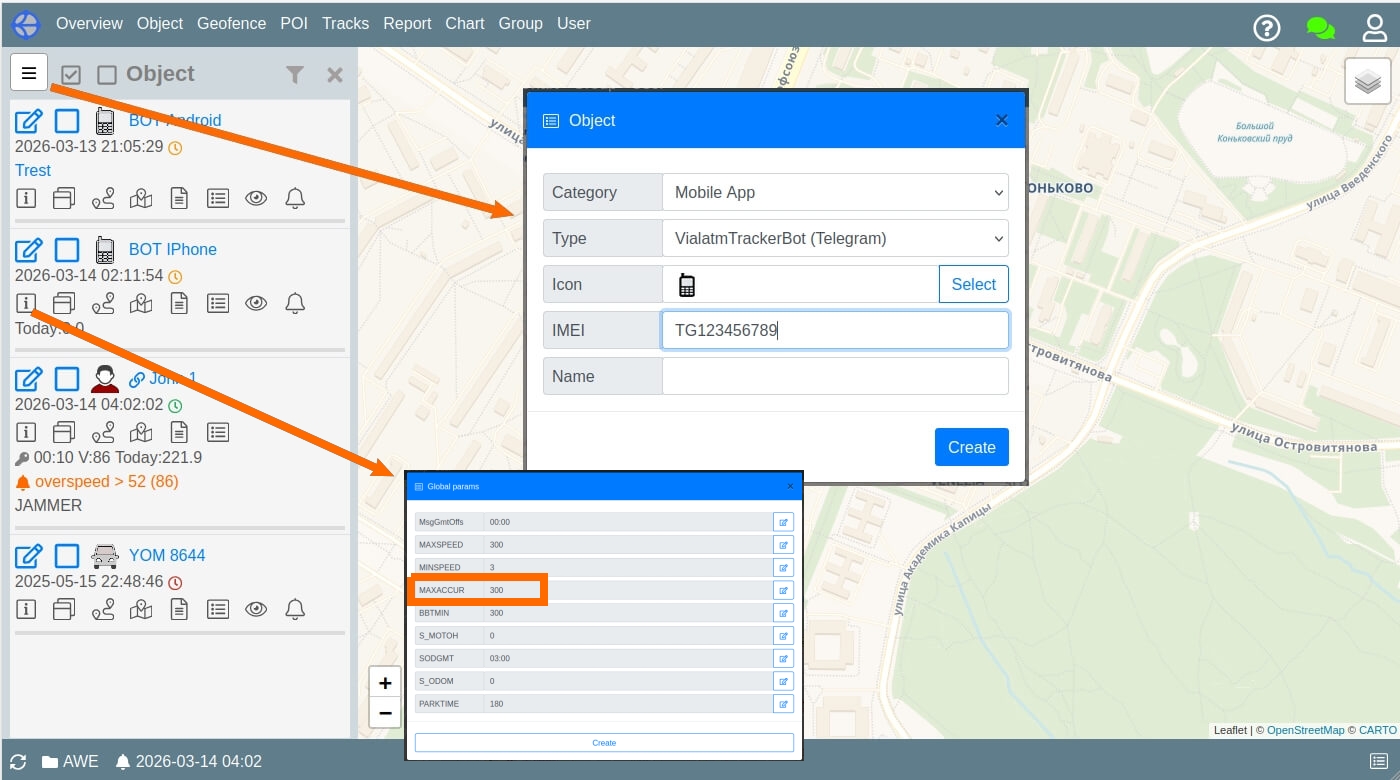
For IMEI, use the value that the bot told you (example : TG123456789)
Open the attachment menu (the 📎 paperclip icon or ➕ plus icon) in the bottom bar.
Select "Location" from the menu.
Choose "Share My Live Location for..." (Send My Current Location will not work for tracking).
Select the time duration (15 minutes, 1 hour, or 8 hours).
Confirm by tapping "Share".
⚠️ Important: Make sure your phone's GPS is turned on and you have granted Telegram permission to access your location "Always" or "While Using the App".
To ensure your location updates smoothly and accurately, please keep the following in mind:
Keep Telegram open: Try not to force-close (swipe away) the app. It works best when running in the background.
Check Background App Refresh: Make sure Telegram has permission to use data and GPS in the background (Settings → Telegram → Background App Refresh).
Disable Battery Saver: High-accuracy tracking may be restricted if your phone is in "Low Power" or "Battery Saver" mode.
Location Permissions: Set location access to "Always" in your phone's privacy settings for the most reliable broadcast.
You can set a threshold for accepting GPS data to ensure high precision. The bot receives a horizontal_accuracy value (in meters) for every location point.
If the horizontal_accuracy of a point exceeds the limit set in your global device parameters (MAXACCUR), that point will be automatically ignored. This helps filter out "noisy" data and jumps caused by poor satellite reception.